
WEEX Deposit Guide: 3 Best Ways to Fund Your Account
Spot
P2P
Beginner's Guide
WEEX Product Guide
By: WEEX|2026-05-18 03:15:02
0
Share


From crypto deposit to p2p trading. Here is how to fund your WEEX account using web browser only. No app steps included.
TL;DR
- WEEX supports multiple deposit methods including direct crypto wallet transfers, credit/debit card purchases, and p2p trading.
- Always confirm the correct network before transferring. Mismatched networks = funds do not arrive automatically.
- This guide walks through all web-based methods to deposit crypto into your WEEX account and start trading. Examples use USDT (TRC20 Tron blockchain).
How to Find Your WEEX Deposit Address
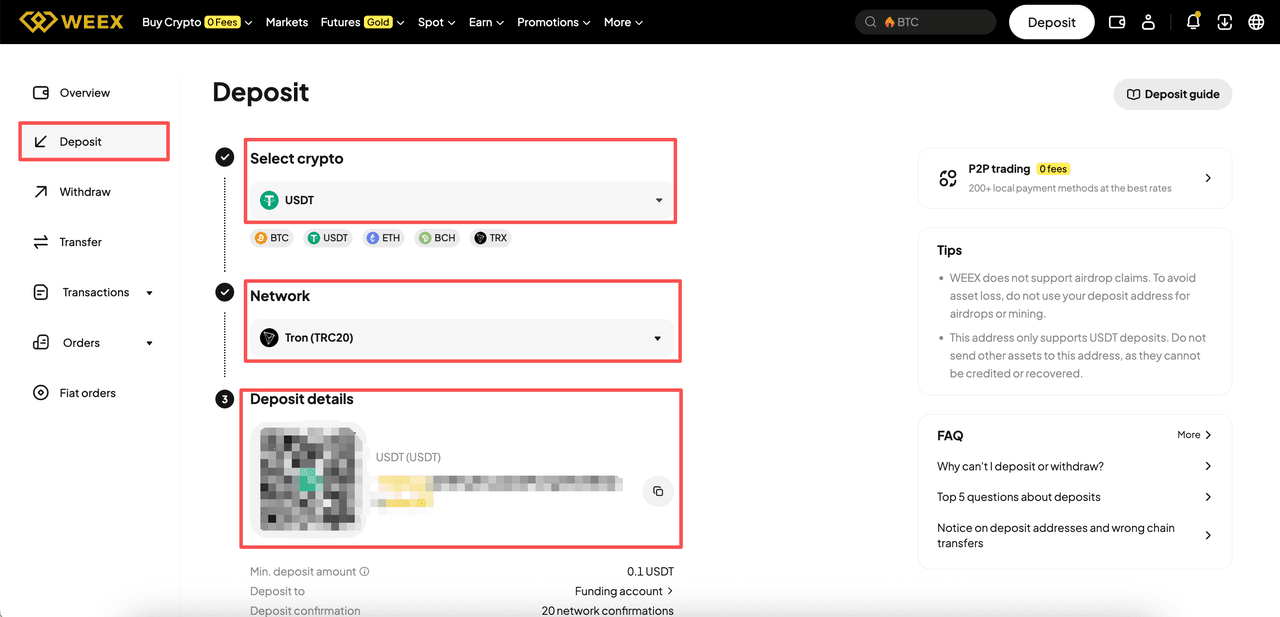
- Step 1: Go to the WEEX website, log in to your account and navigate to the Deposite Page.
- Step 2: Click on Deposit and then select the crypto and network.
- Step 3: Then the page will show the minimum deposit address and QR code.
Method 1 — On-chain Deposit
If you already have a Web3 wallet, transferring crypto to your WEEX account is simple.
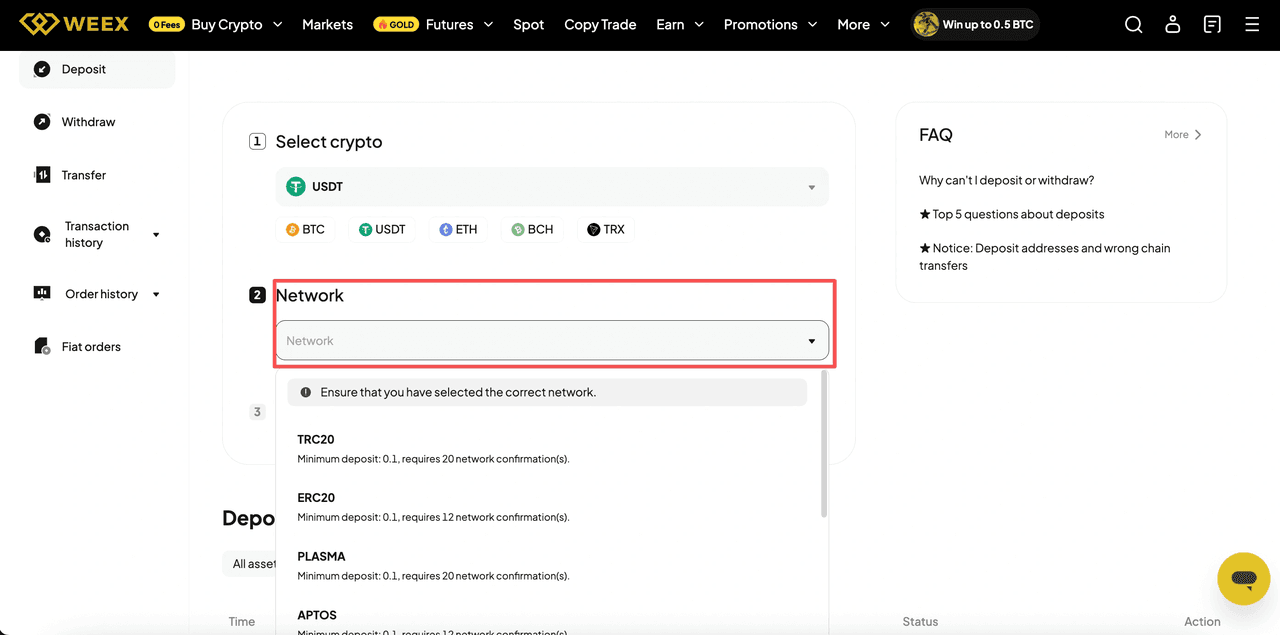
Network mismatch warning: Assets on different blockchains are not compatible. Sending funds from one network to a WEEX deposit address on a different network means your funds will not arrive automatically. Always double-check the network before transferring.
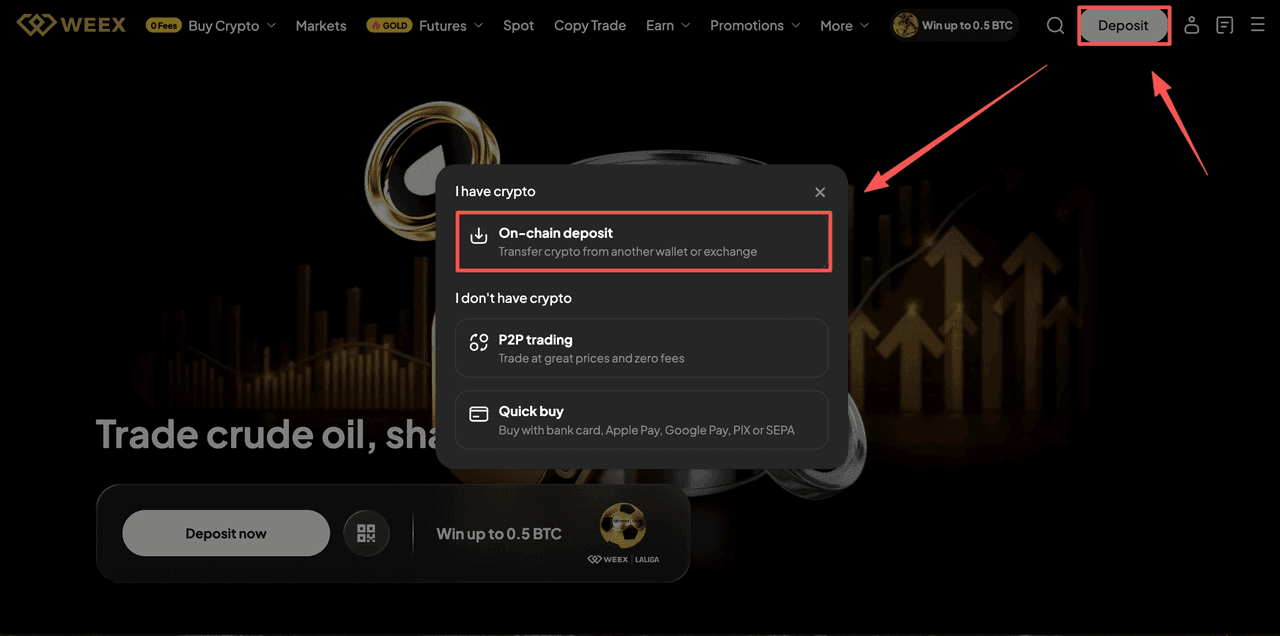
- Step 1: Go WEEX official website and Log in. On the home page, tap "Deposit" and choose on-chain deposit.
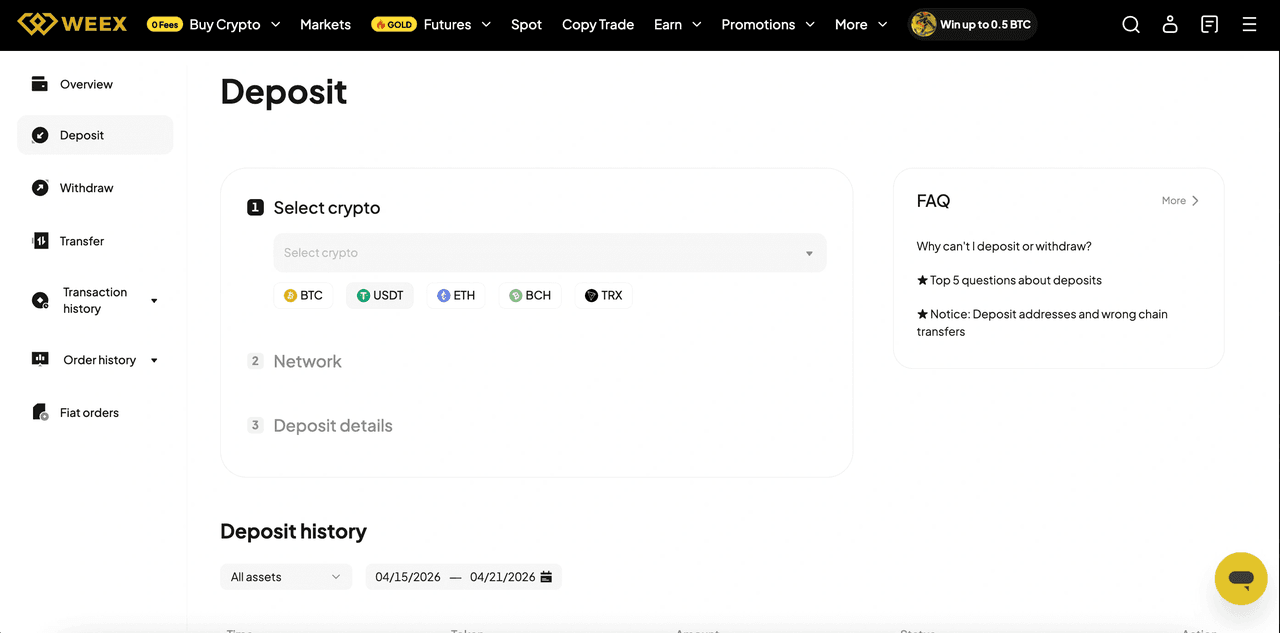
- Step 2: Choose which cryptocurrency you want to deposit. Common options include: USDT/BTC/ETH/SOL.
- Step 3: Choose the Correct Network and enter the amount.
- Step 4: Copy the Deposit Address and Send the Crypto.
- Step 5: Wait for network confirmations. The funds will appear in your WEEX account once confirmed.
Method 2 — Buy Crypto With Fiat
WEEX offers several ways to fund your account using traditional fiat currencies. The two most straightforward methods for web users are:
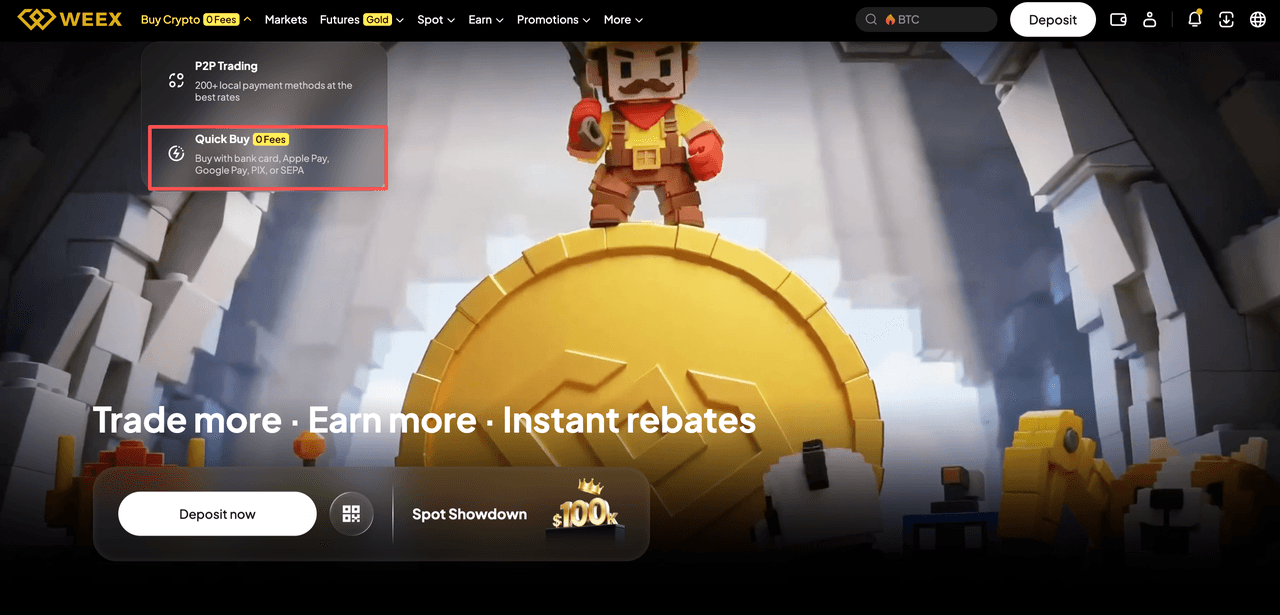
- Quick Buy: Buy crypto instantly with bank card, Apple Pay, Google Pay, PIX or SEPA.
- P2P trading: Buy crypto directly from other users with competitive rates and multiple payment methods
Buy Crypto With Quick Buy
Step 1: On the WEEX website, hover over Quick Buy in the navigation bar.
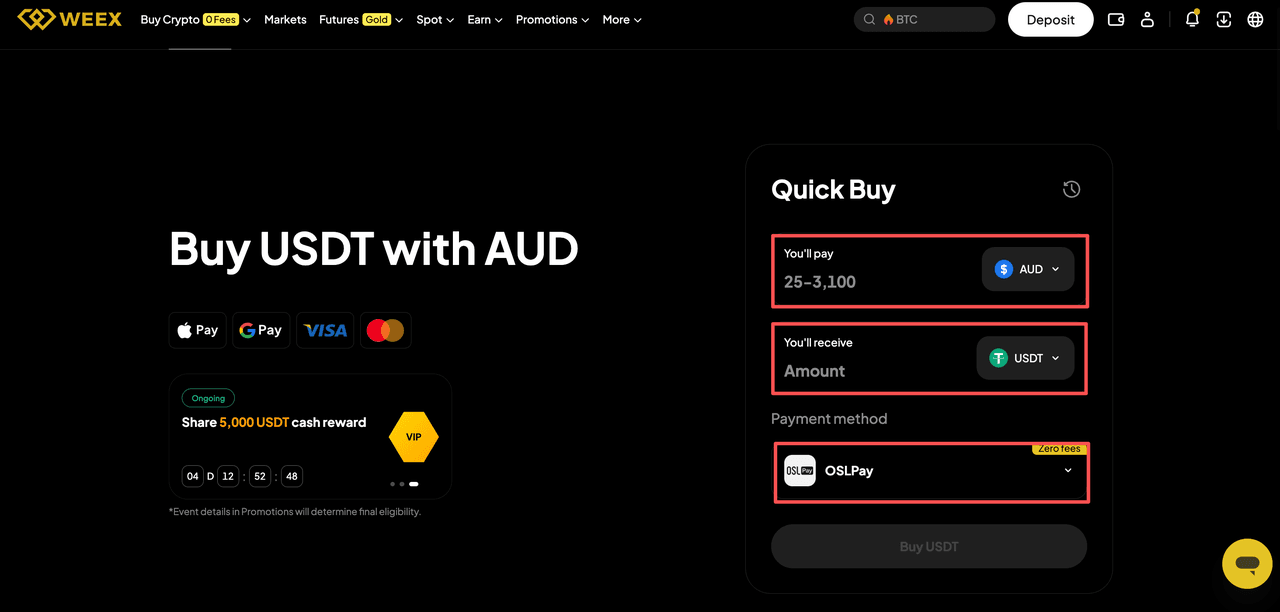
Step 2: Choose the fiat currency you want to use. Select the cryptocurrency you want to buy.
Step 3: Enter the amount of fiat you wish to spend. The expected crypto amount will be displayed.
Step 4: Select your payment method (bank card, Apple Pay, Google Pay, PIX or SEPA).
Step 5: Click Buy and follow the payment provider's flow to complete the transaction.
Buy Crypto via P2P Trading
If you are searching for crypto p2p or weex p2p, here is how it works. P2P trading lets you buy cryptocurrency directly from other users, not from the exchange. The exchange holds the crypto in escrow until the seller confirms receipt of your payment.
How to deposit via P2P on WEEX:
Step 1: On the WEEX website, hover over P2P Trading in the navigation bar.
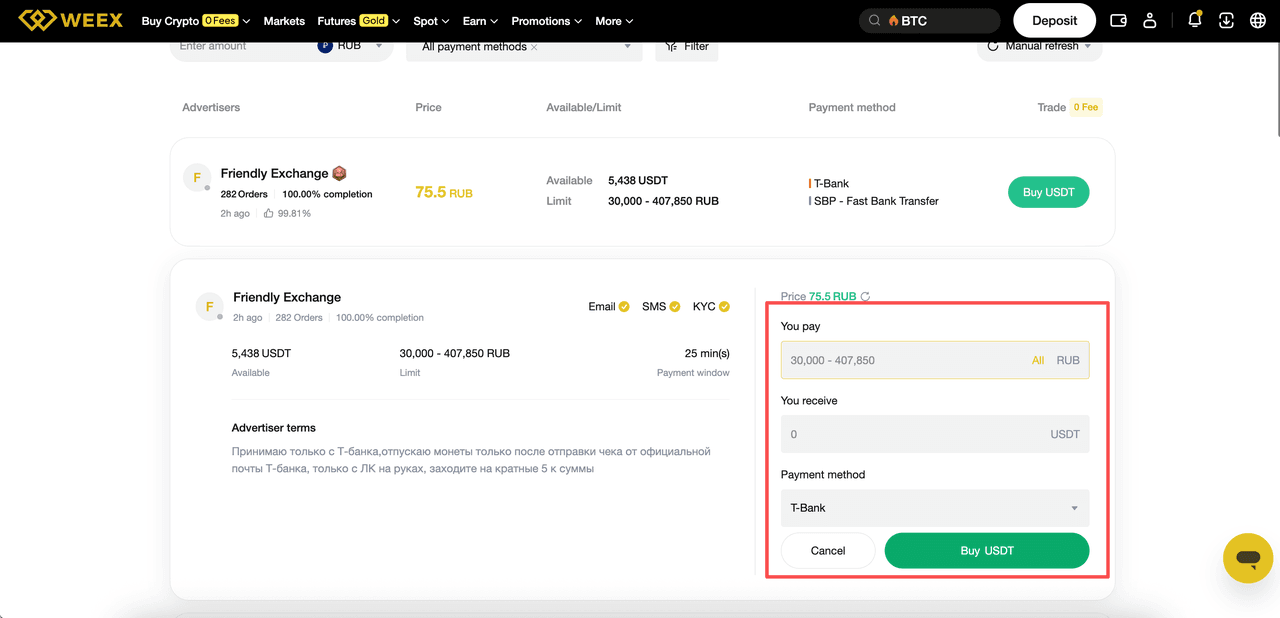
Step 2: Review seller's current limit, price, expected payment time, the number of their completed trades, the average release time, and their terms.
Step 3: Enter the amount of fiat you want to pay and select the method.
Step 4: Review all terms carefully and click on "Buy".
Note: Available payment methods vary by fiat currency and region. Always communicate through the WEEX only — never off-platform.
Conclusion
Depositing funds into WEEX is straightforward once you understand the options. Crypto wallet transfers work best if you already hold crypto. Credit/debit cards are fastest for new users. P2P trading offers the most payment flexibility and zero platform fees.
The one rule that never changes: always confirm the network before sending. Network mismatches are the #1 reason deposits go missing.
If you are searching how to deposit on weex for the first time, start with a small test transaction. Once it clears, repeat with the full amount. That extra step saves headaches if something goes wrong.
Once your deposit arrives, you are ready to trade. Head to spot market, futures, or P2P to put your funds to work.
You may also like

How to Buy Cryptocurrency on WEEX Exchange 2026: Full Guide
Prediction Market Apps 2026: How Prediction Markets Work? Are They Safe and Legal?
Is Polymarket Legal in India in 2026? Key Legal Updates on Prediction Markets
14 Best Prediction Market Apps in 2026: The Ultimate Guide to Crypto-Native and Regulated Platforms
Can Politicians Rig Election Prediction Markets? The Dark Side of Election Prediction Markets
2026 US Election Odds: Who Leads Right Now on Polymarket and Kalshi?
What Is a Crypto Prediction Market? Key Opportunities in the Prediction Market Sector
Plot twist in the AI race—the next big flex is actually physical infra?
How to Profit on Prediction Market: A Beginner's Guide to Prediction Market
Decentralized Prediction Market: A Beginner's Guide for WEEX Users
Kalshi Prediction Market Explained: How It Works and Who Can Use It
What Is WXT Used For? A Beginner's Guide to WEEX Token Utility
Top Prediction Market Websites in 2026: Which Platform Is Best for You?
How to Start Spot Trading on WEEX: No Leverage, No Liquidation Risk
What Is a Prediction Market Platform? How It Works and Key Risks
Can You Make Money on Prediction Markets? Risks and Strategies
Is a Prediction Market Just Gambling? How It Works and Key Risks
What Are the Most Popular Prediction Market Platforms in 2026?
How to Buy Cryptocurrency on WEEX Exchange 2026: Full Guide
Prediction Market Apps 2026: How Prediction Markets Work? Are They Safe and Legal?
Is Polymarket Legal in India in 2026? Key Legal Updates on Prediction Markets
14 Best Prediction Market Apps in 2026: The Ultimate Guide to Crypto-Native and Regulated Platforms
Can Politicians Rig Election Prediction Markets? The Dark Side of Election Prediction Markets
2026 US Election Odds: Who Leads Right Now on Polymarket and Kalshi?
Earn USDT daily with Auto Earn. Enjoy flexible USDT savings. Auto earn passive income while you trade. Simple, secure, no lock-up.
Start Earning Now
Contents
Popular coins


Customer Support:@weikecs
Business Cooperation:@weikecs
Quant Trading & MM:bd@weex.com
VIP Program:support@weex.com
