
How to Deposit And Withdraw Crypto on WEEX Exchange: Web Version


Getting crypto into and out of WEEX is straightforward. But deposit and withdrawal are two different processes.
Below is each one broken down separately. Follow the right guide for what you need right now.
How to Deposit Crypto on WEEX
Use this guide when you want to send crypto from an external wallet into your WEEX account.
Step 1: Click on Deposit
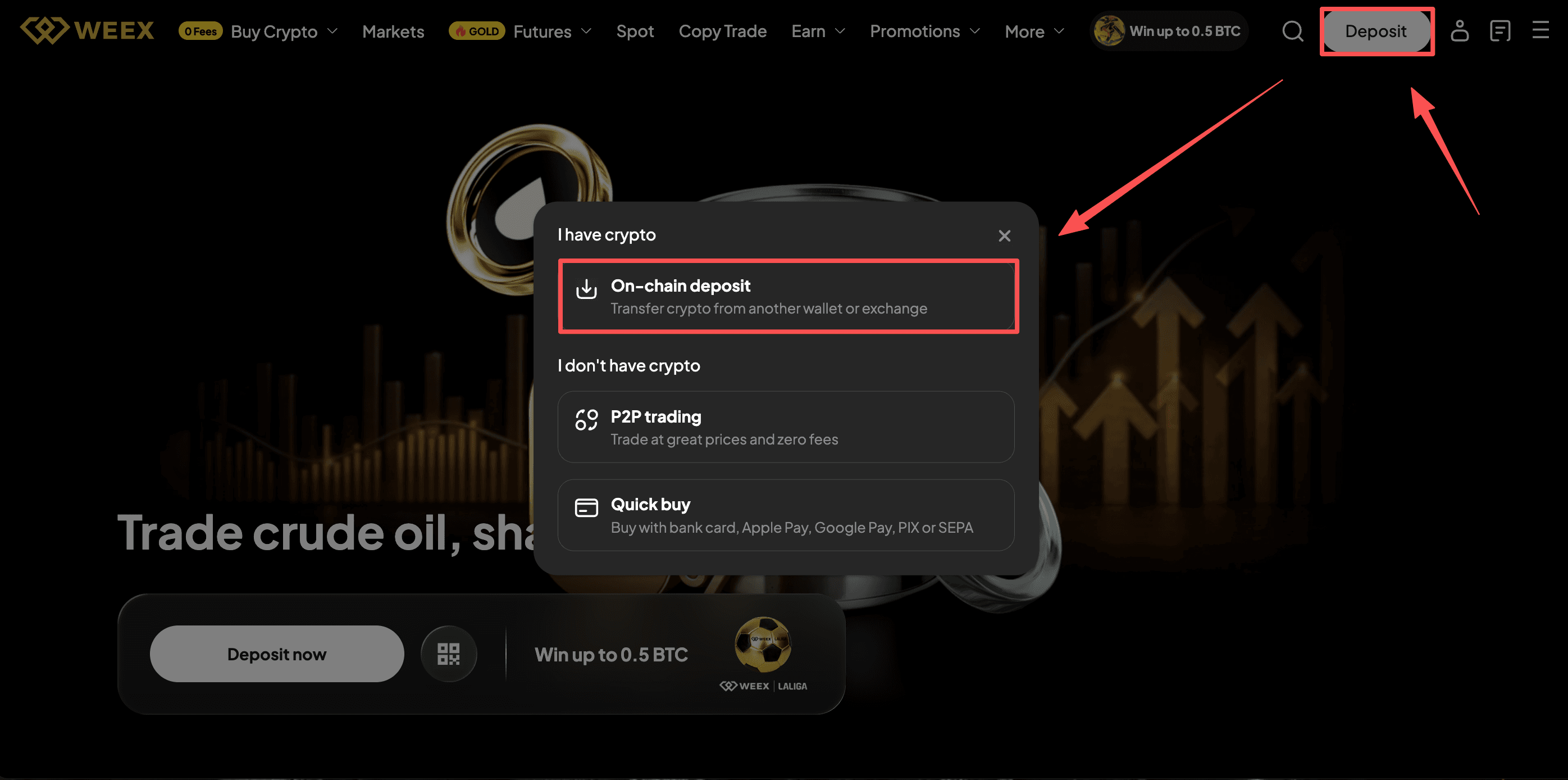
Go WEEX offcial website and Log in. On the home page, tap "Deposit" and choose on-chain deposit.
Step 2: Select Crypto
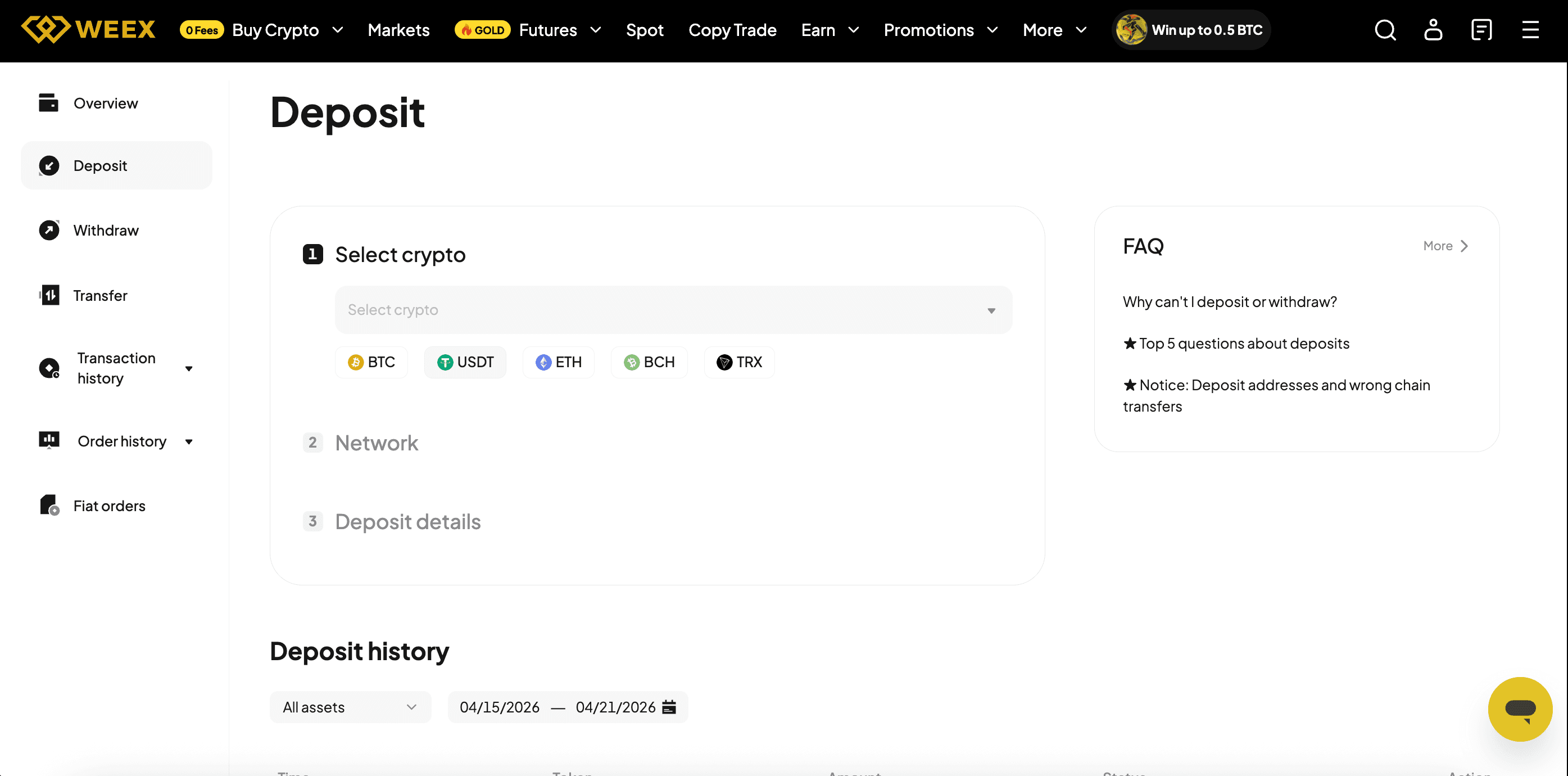
Choose which cryptocurrency you want to deposit. Common options include: USDT/BTC/ETH/SOL.
Only select a coin that WEEX supports. Most major tokens are available.
Step 3: Choose the Correct Network
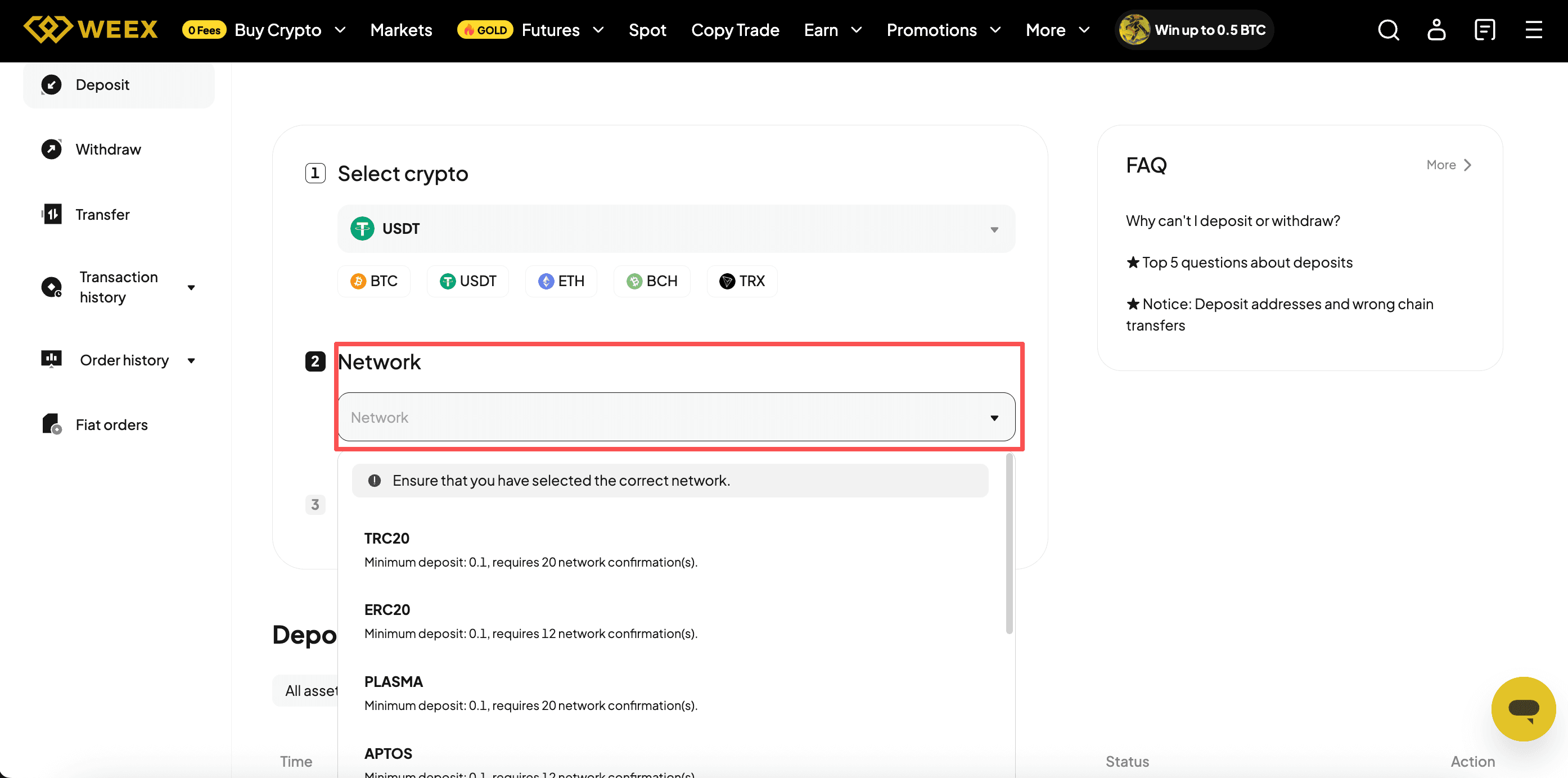
This step decides whether your funds arrive safely.
Note: The network you select on WEEX must exactly match the network your sending wallet uses.
Step 4: Copy the Deposit Address and Send the Crypto
After selecting the network, WEEX generates a unique deposit address.
The deposit usually takes about 10 minutes to appear in your WEEX account. You will receive a confirmation by email and also in the app notification center.
How to Withdraw Crypto from WEEX
Use this guide when you want to move crypto from your WEEX account to an external wallet or another exchange.
Step 1: Click on Withdraw
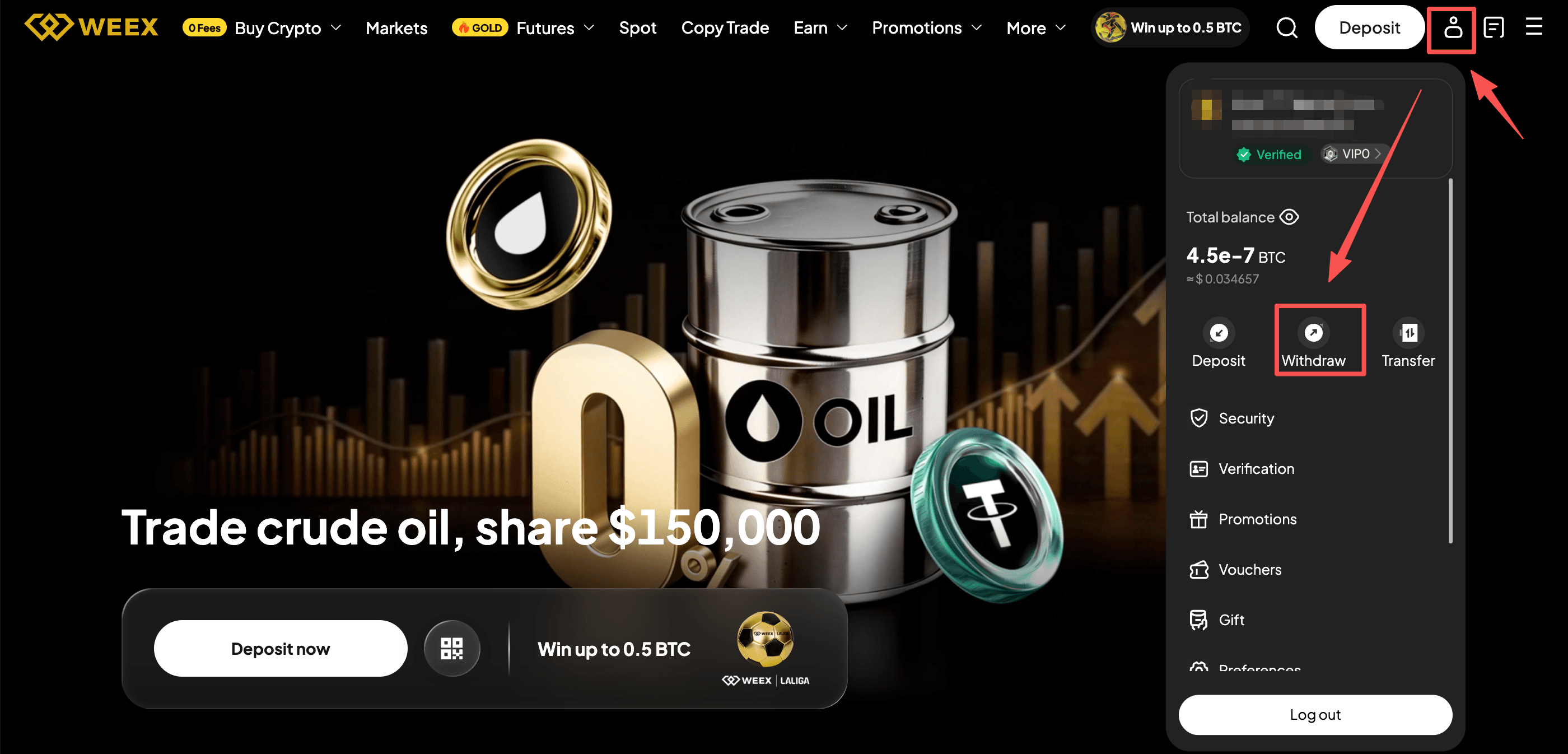
Go WEEX offcial website and Log in. On the home page, tap "Profile" and click on Withdraw.
Step 2: Select the Crypto to Withdraw
Choose which cryptocurrency you want to send out. Common options include: USDT/BTC/ETH/SOL.
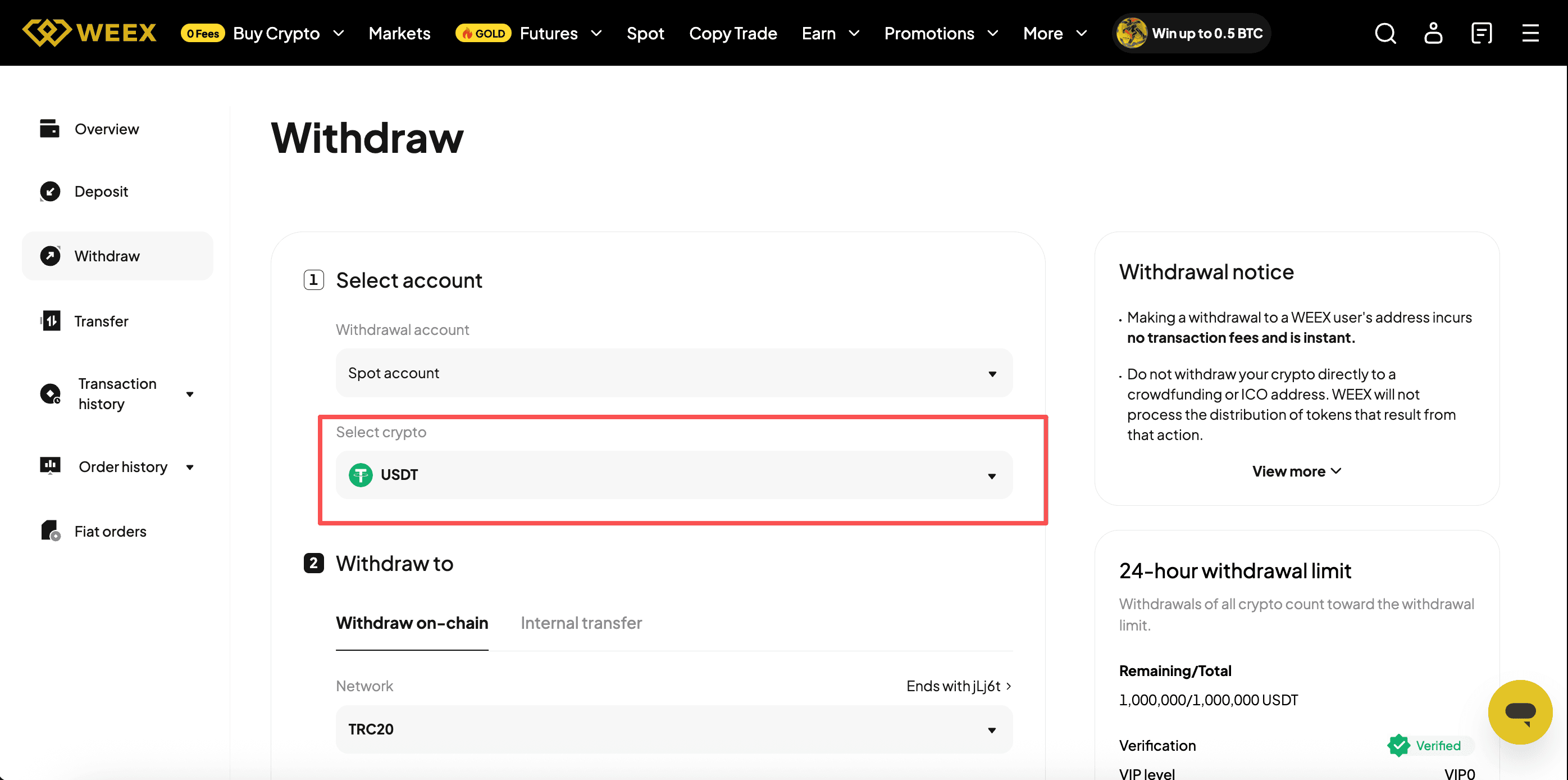
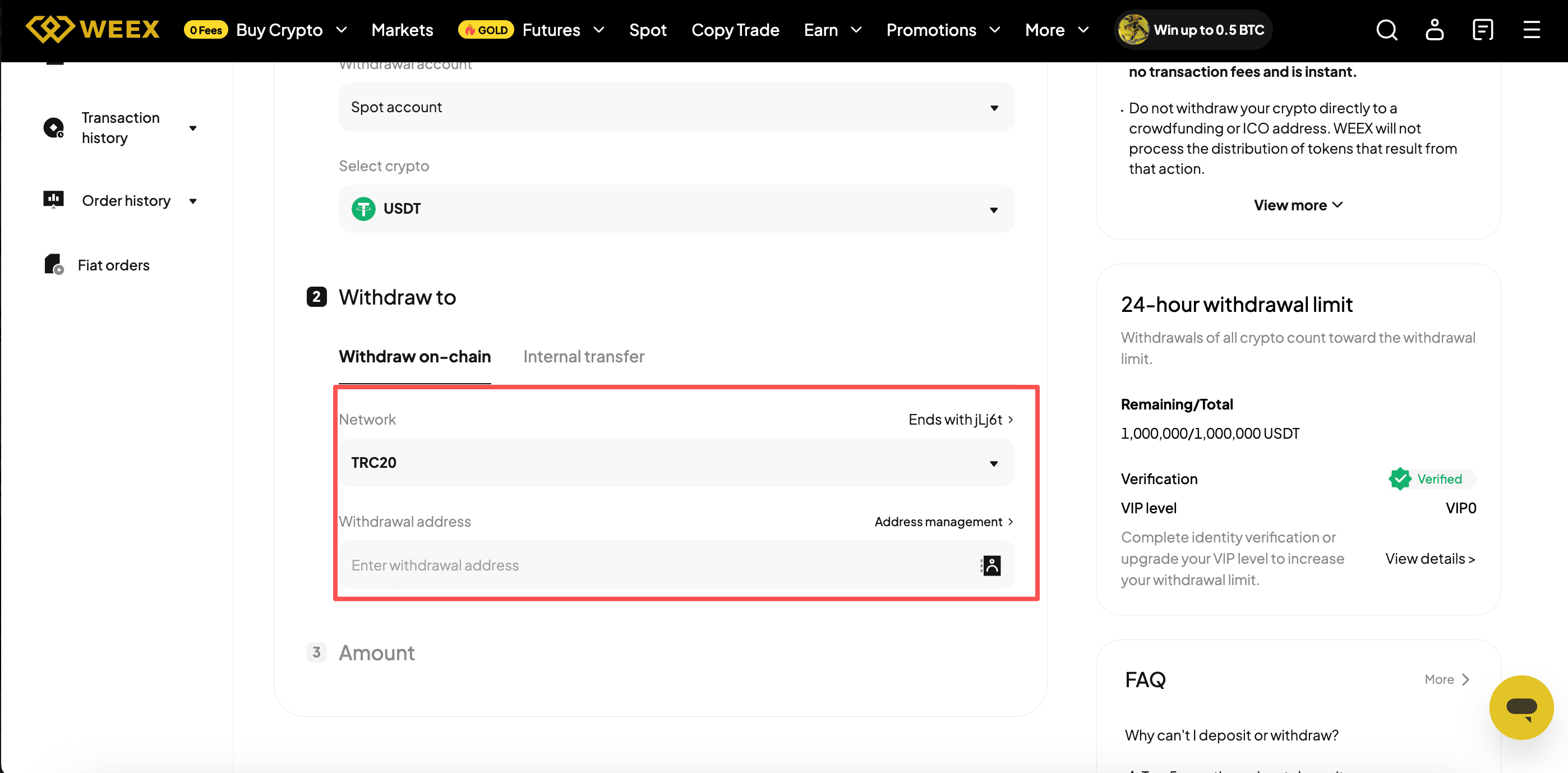
Step 3: Enter Withdrawal Address and Confirm the Network
Paste your external wallet address and select the network (must match the receiving wallet's network)
Note: Double-check both. A wrong address means lost funds. A wrong network also means lost funds. There is no recovery option.
Step 4: Enter the Amount and withdraw crypto
Type how much you want to withdraw. The system will show you:
- The network fee (gas fee)
- The final amount the recipient will receive
After confirmation, the withdrawal is submitted. Processing time depends on the network but usually takes 5 to 30 minutes. You will get an email confirmation once it is completed.
Conclusion
Depositing and withdrawing funds on WEEX is straightforward. You stay in full control of your WXT, BTC, ETH, or USDT with just a few clicks.
Before you confirm any transaction, always double-check three things: the deposit\withdraw address, the amount, and the network.
FAQ
How long does a deposit take on WEEX?
Most deposits take about 10 minutes. You will get a confirmation by email and also in the app.
What happens if I choose the wrong network for deposit?
Your funds will be permanently lost. Always make sure the deposit network matches the one you are sending from.
Can I withdraw crypto without KYC on WEEX?
Yes, up to a daily limit of 10,000 USDT. For larger withdrawals, you will need to complete identity verification.
Does WEEX charge withdrawal fees?
Yes. WEEX charges a small network fee for each withdrawal. The fee depends on the coin and network. For example, BTC withdrawals cost about 0.00016 BTC.
Do I get a confirmation for every deposit and withdrawal?
Yes. You will receive a confirmation by email and also a notification in the app for both deposits and withdrawals.
You may also like

How to Buy Cryptocurrency on WEEX Exchange 2026: Full Guide
Prediction Market Apps 2026: How Prediction Markets Work? Are They Safe and Legal?
Is Polymarket Legal in India in 2026? Key Legal Updates on Prediction Markets
14 Best Prediction Market Apps in 2026: The Ultimate Guide to Crypto-Native and Regulated Platforms
Can Politicians Rig Election Prediction Markets? The Dark Side of Election Prediction Markets
2026 US Election Odds: Who Leads Right Now on Polymarket and Kalshi?
What Is a Crypto Prediction Market? Key Opportunities in the Prediction Market Sector
Plot twist in the AI race—the next big flex is actually physical infra?
How to Profit on Prediction Market: A Beginner's Guide to Prediction Market
Decentralized Prediction Market: A Beginner's Guide for WEEX Users
Kalshi Prediction Market Explained: How It Works and Who Can Use It
What Is WXT Used For? A Beginner's Guide to WEEX Token Utility
Top Prediction Market Websites in 2026: Which Platform Is Best for You?
How to Start Spot Trading on WEEX: No Leverage, No Liquidation Risk
What Is a Prediction Market Platform? How It Works and Key Risks
Can You Make Money on Prediction Markets? Risks and Strategies
Is a Prediction Market Just Gambling? How It Works and Key Risks
What Are the Most Popular Prediction Market Platforms in 2026?
How to Buy Cryptocurrency on WEEX Exchange 2026: Full Guide
Prediction Market Apps 2026: How Prediction Markets Work? Are They Safe and Legal?
Is Polymarket Legal in India in 2026? Key Legal Updates on Prediction Markets
14 Best Prediction Market Apps in 2026: The Ultimate Guide to Crypto-Native and Regulated Platforms
Can Politicians Rig Election Prediction Markets? The Dark Side of Election Prediction Markets
2026 US Election Odds: Who Leads Right Now on Polymarket and Kalshi?
Contents
Popular coins


