
Block Explorer: What It Shows and How to Use It


A block explorer is a search tool for a blockchain. It lets anyone look up transactions, wallet addresses, blocks, token transfers, fees, confirmations, and other public on-chain records without running a full node.
The simple version: if a blockchain is the ledger, a block explorer is the public interface for reading it. When you send crypto, withdraw from an exchange, receive a token, or interact with a smart contract, the block explorer is where you check what actually happened on-chain.
That makes a blockchain explorer one of the most practical tools in crypto. It does not protect you from every mistake, but it gives you receipts when wallets, exchanges, or apps show incomplete information.
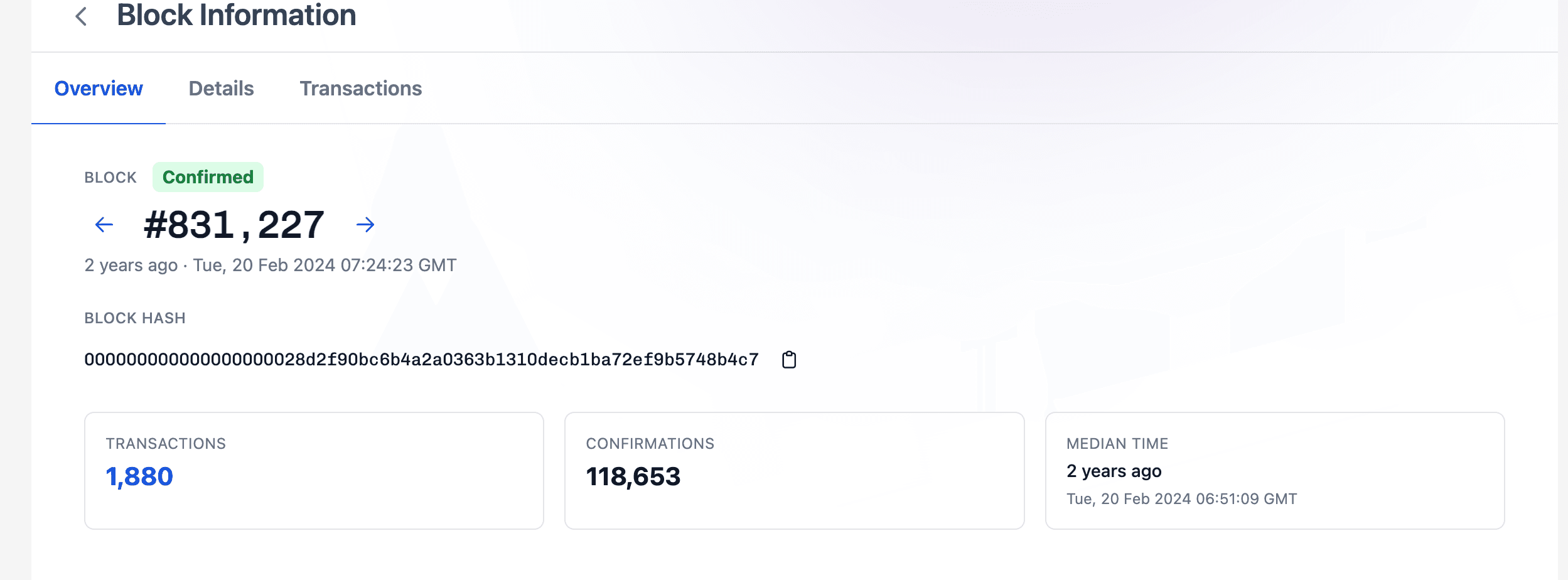
What Does a Block Explorer Show?
A block explorer turns raw blockchain data into readable pages. The exact layout depends on the network, but most explorers let you search by transaction hash, wallet address, block number, token contract, or smart contract address.
| Search item | What it tells you | Why it matters |
|---|---|---|
| Transaction hash or TxID | Status, sender, receiver, amount, fee, timestamp, block number | Confirms whether a transfer happened |
| Wallet address | Public balance, token holdings, and transaction history | Helps review activity tied to an address |
| Block height | A specific block's place in chain history | Shows confirmations and network sequencing |
| Token contract | Token supply, transfers, holders, and contract details | Helps verify whether a token is official |
| Gas or network fee | Cost paid to process the transaction | Explains expensive, delayed, or failed transfers |
For Bitcoin, a block explorer usually focuses on blocks, transaction IDs, fees, mempool activity, and confirmations. For Ethereum and other smart contract chains, explorers also show contract calls, token transfers, approvals, gas usage, and sometimes decoded transaction data.
The important point is that each blockchain needs the correct explorer. A Bitcoin transaction will not appear on Etherscan, and an Ethereum transaction will not appear on a Bitcoin explorer. Wrong-network confusion is one of the easiest ways beginners misread their own transfers.
How To Use a Block Explorer To Check a Transaction
The most common use case is checking whether a crypto transfer arrived.
First, copy the transaction hash, also called a TxID, from your wallet or exchange withdrawal page. Then open the explorer for the network you used. Paste the TxID into the search bar and check the transaction status.
A confirmed or successful transaction means the network processed it. A pending transaction usually means it is waiting for inclusion in a block or still needs enough confirmations. A failed transaction means the action did not complete, though network fees may still be spent on some chains.
Before moving assets into spot trading on WEEX, the practical checklist is simple: confirm the network, copy the TxID, verify the receiving address, and wait for the required confirmations. Do not rely only on a wallet's "pending" screen if meaningful money is involved.
Block Explorer vs Crypto Wallet
A crypto wallet lets you hold private keys, sign transactions, and manage assets. A block explorer does not hold funds, sign messages, or move assets. It only reads public blockchain data.
That distinction matters. If your wallet says a transfer is missing but the block explorer shows the transaction as confirmed to the correct address, the issue may be with wallet indexing, exchange crediting, or network confirmation requirements. If the explorer shows the wrong destination address, the problem is much more serious.
A block explorer is not customer support. It can show what happened, but it cannot reverse a transaction, identify a scammer with certainty, or recover funds sent to the wrong address.
What a Block Explorer Cannot Prove
A block explorer is transparent, but it is not omniscient.
It can show that an address received funds. It cannot automatically prove who controls that address. Some explorers label exchange wallets, bridges, contracts, or known entities, but labels can be incomplete, delayed, or wrong. Ownership usually requires external evidence, such as a signed message, official project documentation, or exchange confirmation.
It also cannot guarantee that a token is legitimate. Scammers can create fake tokens with familiar names and send them to visible wallets. The explorer may show the token transfer, but that does not make the token safe, valuable, or official.
The better habit is to treat explorer data as evidence, not interpretation. The data tells you what happened on-chain. You still need judgment to understand whether it was expected, safe, or relevant.
Common Block Explorer Mistakes
The mistakes that cost users money are usually operational, not theoretical.
| Mistake | Why it happens | Safer habit |
|---|---|---|
| Using the wrong network explorer | User sent assets on one chain but checks another | Match the chain before searching the TxID |
| Trusting fake token transfers | Scam tokens appear in wallet history | Verify contract addresses through official sources |
| Assuming "confirmed" means recoverable | Confirmed transactions are usually final | Check recipient and network before sending |
| Ignoring failed transaction fees | Some failed smart contract calls still consume gas | Review status and fee fields carefully |
| Treating labels as proof | Address labels may be incomplete | Use labels as clues, not final evidence |
Experienced users do not use a block explorer only after something goes wrong. They use it before signing risky contract approvals, after exchange withdrawals, when checking large transfers, and when verifying whether a token contract matches the official source.
Conclusion
A block explorer is one of the clearest windows into crypto activity. It helps users verify transactions, inspect wallet activity, check confirmations, understand fees, and spot obvious mismatches between what an app says and what the blockchain records.
The main lesson is practical: use the right explorer for the right network, read the status fields carefully, and remember that public data still needs context. Before depositing, withdrawing, or trading on WEEX, a block explorer can help you confirm the transaction trail instead of guessing from wallet notifications alone.
FAQ
What is a block explorer in crypto?
A block explorer is a tool that lets users search and read public blockchain data, including transactions, wallet addresses, blocks, token transfers, fees, and confirmations.
Is a block explorer the same as a wallet?
No. A wallet signs transactions and manages private keys. A block explorer only displays public blockchain records. It cannot move your funds or recover a mistaken transfer.
Why can't I find my transaction on a block explorer?
You may be using the wrong network explorer, the transaction may not have been broadcast yet, or the explorer may not have indexed the latest block. Check the network and TxID first.
Can a block explorer show who owns a wallet?
Usually no. It can show public address activity, but it cannot prove real-world identity unless there is external evidence, such as a verified label or signed message.
Can a block explorer reverse a crypto transaction?
No. A block explorer is read-only. It can show whether a transaction succeeded, failed, or remains pending, but it cannot reverse confirmed blockchain activity.
Risk Warning
Crypto assets are volatile and blockchain transactions can result in partial or total loss if funds are sent to the wrong address, wrong network, fake token contract, or unsupported deposit route. A block explorer can help verify public on-chain activity, but it cannot reverse confirmed transfers, prove identity by itself, or remove custody, liquidity, smart-contract, counterparty, or regulatory risk.
You may also like

How to Buy Cryptocurrency on WEEX Exchange 2026: Full Guide
Prediction Market Apps 2026: How Prediction Markets Work? Are They Safe and Legal?
Is Polymarket Legal in India in 2026? Key Legal Updates on Prediction Markets
14 Best Prediction Market Apps in 2026: The Ultimate Guide to Crypto-Native and Regulated Platforms
Can Politicians Rig Election Prediction Markets? The Dark Side of Election Prediction Markets
2026 US Election Odds: Who Leads Right Now on Polymarket and Kalshi?
What Is a Crypto Prediction Market? Key Opportunities in the Prediction Market Sector
Plot twist in the AI race—the next big flex is actually physical infra?
How to Profit on Prediction Market: A Beginner's Guide to Prediction Market
Decentralized Prediction Market: A Beginner's Guide for WEEX Users
Kalshi Prediction Market Explained: How It Works and Who Can Use It
What Is WXT Used For? A Beginner's Guide to WEEX Token Utility
Top Prediction Market Websites in 2026: Which Platform Is Best for You?
How to Start Spot Trading on WEEX: No Leverage, No Liquidation Risk
What Is a Prediction Market Platform? How It Works and Key Risks
Can You Make Money on Prediction Markets? Risks and Strategies
Is a Prediction Market Just Gambling? How It Works and Key Risks
What Are the Most Popular Prediction Market Platforms in 2026?
How to Buy Cryptocurrency on WEEX Exchange 2026: Full Guide
Prediction Market Apps 2026: How Prediction Markets Work? Are They Safe and Legal?
Is Polymarket Legal in India in 2026? Key Legal Updates on Prediction Markets
14 Best Prediction Market Apps in 2026: The Ultimate Guide to Crypto-Native and Regulated Platforms
Can Politicians Rig Election Prediction Markets? The Dark Side of Election Prediction Markets
2026 US Election Odds: Who Leads Right Now on Polymarket and Kalshi?
Contents
Popular coins


